Your office has moved. The boxes are inside. Now how do you get your computers, phones, and network working again? Office cabling and setup after relocation determines whether your team is productive on day one or staring at blank screens for a week. This guide walks you through every step of post-move IT installation. You will learn about structured cabling, network setup, ISP coordination, and common pitfalls to avoid. Follow these steps to ensure your Durham office is fully operational fast.
Why Post-Move Cabling Determines Your Success
Moving day feels complete when the last box crosses the threshold. But the real work is just beginning. Your office’s technology infrastructure is its nervous system. Without it, nothing functions.
Many businesses assume IT will “just work” in the new space . That assumption leads to costly downtime. Employees cannot email. Printers sit silent. Internet connections fail. Clients wait.
The truth is that office cabling after relocation Durham requires methodical planning. Every device needs proper connections. Every cable must reach its destination. Every network port must be tested.
Professional movers and IT specialists coordinate this process. They ensure your office network cabling Durham is ready before your team arrives. They test every connection. They label every port.
The difference between a smooth transition and a chaotic one comes down to preparation. Businesses that plan their post-move setup succeed. Those that wing it struggle.
Pre-Move Planning: The Foundation of Smooth Setup
Successful office cabling starts weeks before moving day. You cannot walk into a new space and expect perfect connectivity without preparation.
Conduct a thorough site survey first. Walk through your new Durham office with your IT team or cabling specialist. Identify where every desk, printer, server, and phone will go. Mark these locations on a floor plan.
Verify existing infrastructure. Does the new space have adequate data points where you need them? Are network ports tested and labelled? Unlabelled or inactive ports delay setup significantly . Confirm every port works and maps to your floor plan.
Identify gaps early. You may need additional data cables, power sockets, or surge protection. Meeting rooms often require extra connections. Design workstations need more power. Plan these additions before moving day.
Coordinate with your internet service provider. Notify your ISP of the move immediately. Schedule installation at your new location well in advance. Some providers require weeks of lead time, especially for fibre connections . Waiting too long means moving in without live internet.
For businesses moving within Durham, local providers understand regional infrastructure. They know which buildings have fibre and which need upgrades. Use this local knowledge.
Structured Cabling: The Backbone of Your Office Network
Structured cabling sounds technical. But understanding the basics helps you make informed decisions.
Structured cabling organizes all your voice and data connections. It runs from a central point (like a server room) to individual wall outlets throughout your office. This system supports phones, computers, printers, and WiFi access points.
Professional installation matters. Poor cabling causes slow speeds, dropped connections, and difficult troubleshooting. Professional structured cabling office Durham follows standards that ensure reliability.
Category ratings determine performance. Cat5e, Cat6, and Cat6a are common options. Cat6 supports faster speeds and better reliability than Cat5e. For most Durham offices, Cat6 provides excellent performance without overspending.
Fibre optic may be necessary for larger spaces. If your office spans multiple floors or buildings, fibre connects different areas at high speed. Your IT consultant can advise based on your specific needs.
Proper cable management prevents headaches. Labelled cables, organised pathways, and neat termination points make future changes easy. Without organisation, troubleshooting becomes a nightmare.
The NEUPC procurement notice for North East Universities shows how seriously institutions take structured cabling . Projects range from single socket replacements to installations of 30+ cables with proper containment. This professional approach applies equally to business offices.
IT Network Setup After the Move
Once cabling is in place, network setup begins. This phase brings your systems to life.
Install and connect network equipment first. Switches, routers, firewalls, and patch panels form the core. Position them in a secure, temperature-controlled space . Servers cannot go just anywhere. They need proper ventilation and access controls.
Configure your network gradually. Start with core switches. Add wireless access points. Then connect individual workstations. Testing at each stage identifies problems early.
WiFi requires careful planning. Access point placement affects coverage and speed. Avoid placing them near metal objects or in corners. Professional site surveys ensure optimal coverage throughout your Durham office.
Test everything before your team arrives. Check every network port. Verify WiFi reaches all areas. Confirm internet speeds match expectations. Run security and firewall checks . Test VPN access for remote workers.
Phone systems need attention too. If you use VoIP phones, they depend entirely on network quality. Test call quality thoroughly. Verify voicemail and auto-attendant functions work correctly.
Professional IT network setup Durham providers handle these tasks efficiently. They bring experience from similar moves. They anticipate problems before they occur.
Post-Move Cabling Checklist
Use this checklist to ensure nothing falls through the cracks after your Durham office relocation.
Week Before Move:
- Confirm ISP installation date and time
- Verify all required cabling is complete
- Test all network ports and document results
- Label every port clearly on the floor plan
- Prepare server room with proper cooling and security
Move Day:
- Supervise equipment placement in server room
- Ensure cables are protected during furniture moving
- Keep critical network equipment accessible
- Document any changes made during setup
First Day After Move:
- Power on servers and core network equipment
- Test internet connectivity from multiple locations
- Verify WiFi coverage throughout office
- Check each workstation connects properly
- Test printers, scanners, and other peripherals
- Confirm phone system functionality
- Run full security checks
First Week After Move:
- Monitor network performance closely
- Gather employee feedback on connectivity
- Address any dead zones or slow areas
- Document final network configuration
- Update network diagrams with any changes
This checklist keeps your post-move office setup Durham on track. Following it systematically prevents missed steps.
Common Cabling and Setup Mistakes
Learn from others’ errors. These mistakes cost Durham businesses time and money.
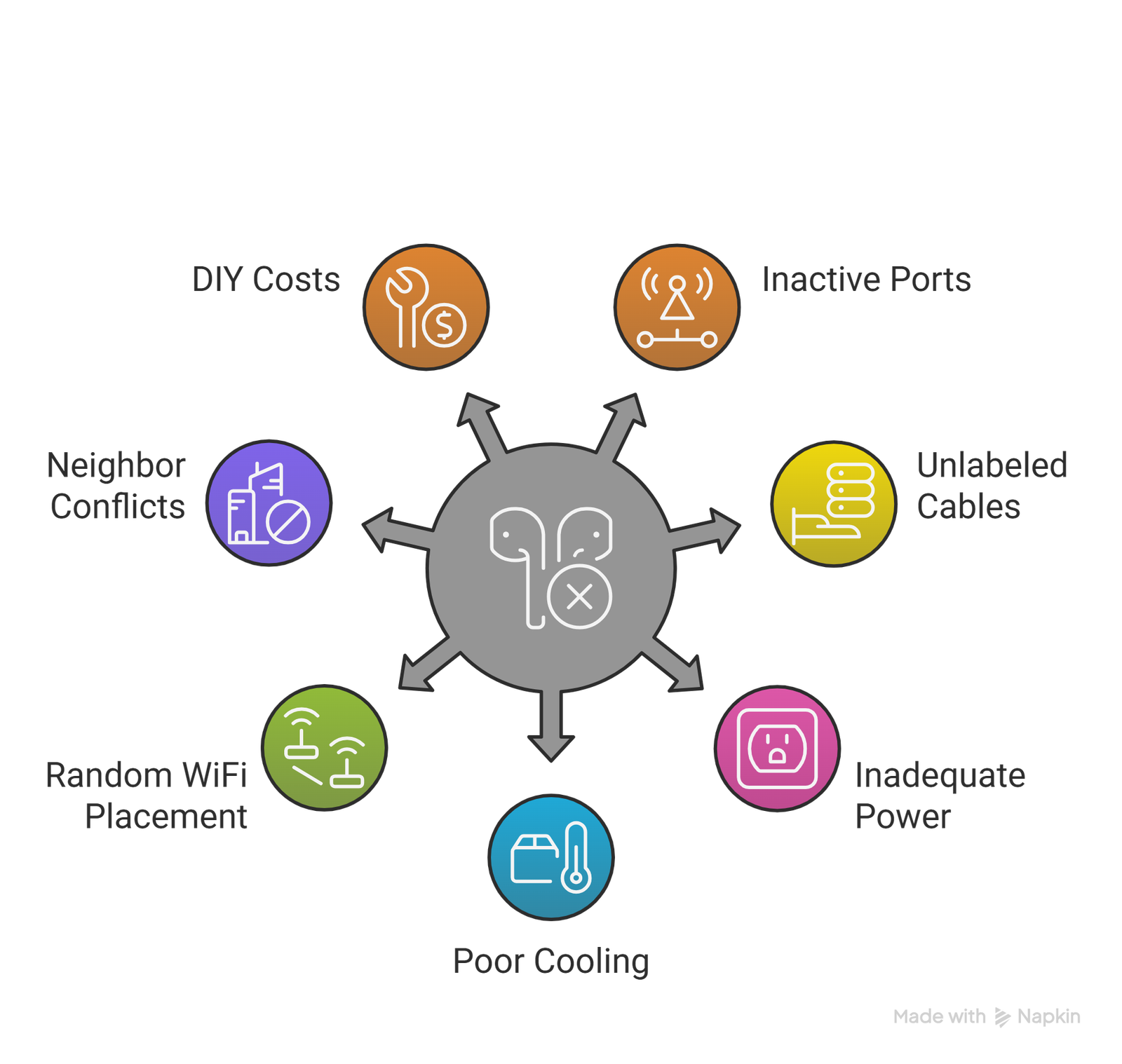
Assuming existing cabling works without testing. Never trust that network ports are active. Test every single one before moving day. Inactive ports discovered after the move cause delays.
Forgetting to label cables during disconnect. That spaghetti mess behind your server rack? Recreating it without labels is nearly impossible. Label everything before unplugging.
Poor planning for power requirements. Server rooms need adequate, dedicated circuits. Regular office outlets may not handle the load. Verify power capacity early.
Ignoring cooling needs. Network equipment generates heat. Without proper cooling, performance suffers and equipment fails. Ensure your server room has adequate ventilation or air conditioning.
Rushing the WiFi setup. Placing access points randomly creates dead zones. Professional site surveys prevent this. Invest the time upfront.
Failing to coordinate with neighbours. In shared Durham buildings, construction or cabling work may affect others. Check lease agreements and building rules before starting.
Not budgeting for professional help. DIY cabling seems cheaper but often costs more in the long run. Professional corporate office wiring Durham ensures reliability and reduces future problems.
Working with Professional Cabling and IT Partners
You do not have to handle this alone. Professional partners bring expertise and efficiency.
Commercial movers with IT experience understand technology’s importance. Companies like The Armstrong Company emphasize that hiring experienced office movers ensures proper handling of cabling and vendor coordination . They transport equipment and coordinate with electricians, ISPs, and IT specialists.
Specialized IT relocation experts handle complex setups. They manage server moves, data integrity, and business continuity. They use climate-controlled transport for delicate hardware . They implement backup solutions to prevent service interruptions.
Local Durham providers understand regional specifics. They know which buildings have fibre. They understand local ISP timelines. They have relationships with other vendors.
Structured cabling specialists install according to standards. They follow best practices for cable routing, termination, and testing. They provide documentation for future reference.
When choosing partners, look for proven experience with office technology installation Durham. Ask for references from similar businesses. Verify insurance and certifications.
The combination of professional movers and IT specialists creates seamless transitions. Your team focuses on business. They focus on technology.
Technology Considerations for Modern Durham Offices
Durham’s business environment continues evolving. Modern offices need more than basic connectivity.
High-speed fibre internet is essential for cloud-based operations. Video conferencing, large file transfers, and remote access all demand bandwidth. Verify your new location supports fibre connections .
Smart office technology improves efficiency. IoT-enabled lighting, AI-powered security, and automated climate control enhance workplace comfort. These systems rely on robust network infrastructure .
Digital conference rooms support modern collaboration. AR and VR capabilities enhance virtual meetings. Screensharing and video conferencing require reliable, high-speed connections .
Hybrid work support matters more than ever. Remote employees need seamless VPN access. In-office workers need reliable connections for video calls. Your network must support both simultaneously.
Sustainability considerations influence decisions. Energy-efficient equipment reduces costs. Smart building systems optimize power usage. Green practices appeal to employees and clients alike.
Professional office relocation setup guide Durham resources help you navigate these choices. Experts advise on current needs and future requirements.
Final Testing and Employee Transition
The moment arrives when systems are ready. But verification continues.
Conduct thorough user acceptance testing. Have employees from each department test their workstations. They notice issues you might miss. Create a simple reporting process for problems.
Verify all software functions correctly. Licenses may need reactivation after hardware changes. Some services tie to IP addresses or locations . Confirm everything works before depending on it.
Check backups immediately. Ensure backup systems function after the move. Verify data integrity. Test restoration procedures. This safety net protects against unexpected issues.
Gather feedback during the first week. Ask employees about connectivity, speed, and any difficulties. Address problems promptly. Small issues fixed early prevent larger complaints later.
Document everything for future reference. Update network diagrams. Record cable labels and port mappings. Note ISP account details and support contacts. This documentation proves invaluable for future moves or troubleshooting.
Trust Metropolitan Movers for Complete Office Relocation
At Metropolitan Movers in Durham, we understand that moving your office is about more than furniture. It is about keeping your business running. With over 10 years of experience and a 98% customer satisfaction rate, we coordinate every detail of your relocation—including cabling and setup.
Our office movers in Durham work with trusted IT partners to ensure seamless transitions. We handle the heavy lifting so you focus on your business. We coordinate with vendors, protect your equipment, and minimize downtime. Our transparent pricing means no surprises. Our punctuality means your schedule stays on track.
Ready to move your Durham office without the stress? Contact Metropolitan Movers today for a free, no-obligation quote. Let us handle the complexity while you focus on what matters most—your business.
Top 5 FAQs About Office Cabling After Relocation
How long does office cabling take after a move?
Timing varies by office size. Small offices may take one to two days. Larger spaces with extensive cabling need a week or more. Plan cabling before moving furniture for fastest results.
Can I use my existing cables in the new office?
Maybe, but reuse is limited. Cable lengths rarely match new floor plans. Older cables may not support current speed requirements. Professional assessment determines what stays and what goes.
Do I need Cat6 or is Cat5e sufficient?
Cat6 supports faster speeds and better reliability. It handles future bandwidth needs better. For most Durham offices, Cat6 is worth the small additional investment. Your IT provider can advise based on your specific needs.
How far in advance should I contact my ISP?
Contact your ISP at least four to six weeks before moving. Fibre installations often require longer lead times. Confirm installation dates before finalizing your move schedule.
What happens if my network isn’t ready on move-in day?
Without network access, employees cannot work. Productivity stops. Client commitments suffer. That is why early planning and professional partners matter. Testing everything before move-in prevents this scenario.